| 
Real Children Learn
In Virtual Words
|
| 
|
| |
| |
| |
| INTRODUCTION
The work is original in its kind because it involves
children interacting in tri-dimensional chat-lines with adults,
who are willing to "virtually" realize – with 3D constructions
– the children’s desires.
The following is a research work, since adults are engaged in
verifying the impact of new communication technologies in children,
taking note of behavior, hypotheses, graphic realizations, as
well as of the memory itself of such experience. A mixed community
is thereby created, involving: teachers, parents, children,
and people not directly related to the school world. Communication
occurs via chat, e-mail and telephone, giving rise to a strong
social interaction.
This
new solution of virtual community for the (3-5 years old) child
has a strong social-educational and pedagogic impact. We believe
that this virtual community is well suited for reflections on
experience and on the analysis of the behavior resulting from
it.
New solutions for virtual
(and real) communities - Internet for the child
"What
is real, what is virtual and what
do we men as image of something which is real?"
Philosophers and scientists have
long debated it, and we do not pretend to answer this question:
we would only like, with the opportunity we have, to tell you
how school-children aged three, four and five are working on
these questions, and how they are interacting with a tri-dimensional
chat: Active Worlds. |
|
| |
| The long-distance instrument to communicate
and cooperate,
and how the idea was born:
It is possible to communicate and cooperate long-distance
(through the Internet) with a software which enables to talk
with more users simultaneously, and to build tri-dimensional
objects (e.g., a house) all users interact with.
The software used in this form of computer-mediated communication
is called "chat". There are different kind of chats, some of
them simply consist in text display using the keyboard, while
some other chats, such as the one we are talking about in this
document, are enriched with a tri-dimensional graphic interface.
The chat we utilized during the period of some months is named
Active Worlds. Since this communication form is multimedia,
it is necessary to download the software from the related Internet
Website. The procedure starts with the Internet site search
through a tool called browser. When the desired Website is found
and accessed, it is possible to download the program which is
supplied in multi-language versions (including Italian).
Active Worlds can be defined a system of tri-dimensional virtual
worlds (Italian, Spanish, Russian, English, and American worlds)
where some people have the responsibility that all the activities
are carried out correctly; these supervisors are called Public
Speakers, and are recognized by bold writing. Worlds can be
traveled by users in the form of "AVATARS". |
|
| |
| 
|
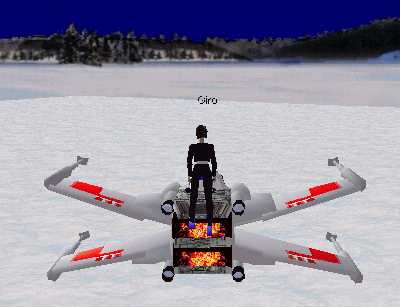
Avatar Giro
in the winter active world
on a
virtual jet |
| |
| Avatars are characters divided in categories,
such as: men, women, animals, objects, and each user can choose
the one he/she prefers. These characters have a nickname that
can be chosen at the program start, and have the peculiarity
of being animated. Avatars can walk, run, fly, dance, fall,
etc. Due to this fact, we can say that the worlds of the chat
mentioned above are "active".
The users of active worlds can be citizen or tourists. Tourists
can only access a part of the options of the chat system and
do not have all the privileges: they cannot send telegrams,
create a contact list of friends and join them wherever they
are, modify the avatar and create buildings....
All these privileges can be obtained paying a yearly subscription
fee, in this way becoming citizens. Our experience has been
carried out in this context. |
|
| |
| Following is a list of possible actions:
- It is possible to access a world if
is market with a green sign;
- It is possible to talk to each other
and to build objects together (e.g., a house)
- It is possible to visit places together
- It is possible to look using different
points of view. Choosing button "eye" it is possible to
display the objects within a short, medium or long range
distance;
- It is possible to explore through
the worlds alone, or with the guide of other tourists/citizens;
- It is possible to choose an empty
world marked with temporary 0 visitors or with more visitors
(marked with a number of 1 or more);
- It is possible
to listen to music, and -for citizens- to add the desired
music
- It is possible
to show pictures and videos....
Active world thus gives us
a visual space context where long-distance conversations are
carried out, and it represents the access interface to educational
resources, in addition to educational content. The three classes
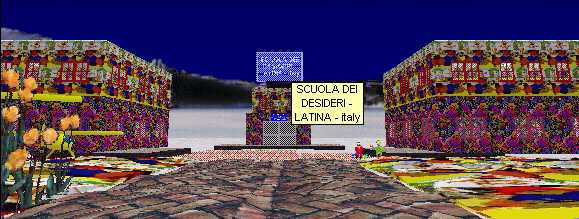
of Latina's school involved have their own "active worlds" called
"AW", "ITALIA" and "WINTER". In these worlds, virtual spaces
for children have been reserved, where they can meet with other
people and play in real time. |
|
| |
| In our project we have two different kinds
of communication-cooperation:
1. Mature Communication
- Cooperation
During summer 1998 I started
to interact in Active Worlds, and I have met Alberto De Gerolamo
(Reggio Calabria, Italy), Renee Saari (Michigamme, Michigan
USA) and Alessandra Visser (Ferrara, Italy). After a discussion
with the school colleague Patrizia Carlaccini (nickname "Onda")
I proposed our chat friends a project for the realization of
virtual spaces inside "active worlds".
Purpose of the project was
to verify children behavior in the virtual worlds, and to determine
if navigation inside these worlds could give an "added value"
for children learning of space, logic and communicative skills.
Back to school, we involved colleagues from other classes in
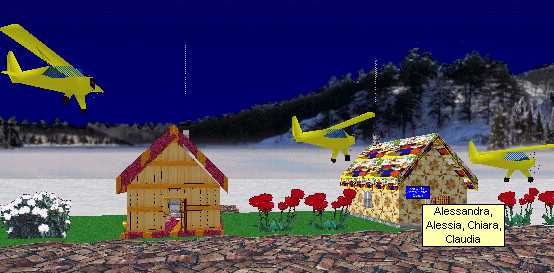
this project. Our long-distance friends realized, in the active
world "WINTER", the house of the teacher, the airport, the school
café, the airplanes, the ice joust, the children exhibition
and so on...; in the active world "ITALIA" there are the children
joust and their work exhibit (on line drawings), in active world
"AW" there is my house, built over a swimming-pool.
|
|
| |
| |
| |
| 2. Communication - cooperation mature- child
We have formed small groups
of children, and we have organized an "on line treasure hunt"
in the "AW" swimming pool. Using a mouse and the arrows keys,
children have followed our friend's avatars around; and then
we saw again, in off-line mode, a related CD that I have realized
for the discussion session. After this session, children have
filled a questionnaire (which was common to all classes), giving
their impressions and thoughts on the avatars' meeting, and
how their school should be built. Later on, the children's drawing
have been sent via e-mail to all long-distance friends met in
the project: once the drawings have been published on the Web,
our long-distance friends have organized exhibits of the children's
drawings. Starting with the comparison of the real school, where
we spend the all day, and the virtual school created by our
long-distance friends, we have had discussions and opinions
exchanges.. |
|
| |
| 
|
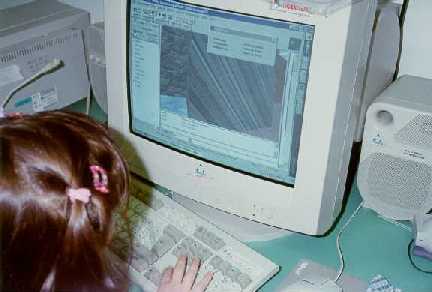
The project has been analyzed
from active worlds educative center,
which gave us the opportunity
to create a complete world
for education and tests. |
| |
| 
|
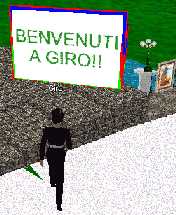
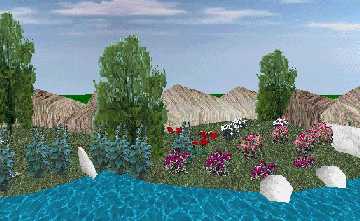
During this summer,
our friends started to build
nice places for children
in the world "GIRO",
and other virtual spaces
will be destined for the meeting
of children's parents and teachers. |
| |
Giro's World
|
| |
| |
| |
| Preliminary conclusions
I believe that that this experience has been
very important for such small children. It lays the foundation
for a constructive opening to the outside world, through the
Internet, and it enables adults to verify the degree of comprehension
reached, with respect to the differences between reality, fantasy
and virtuality.
Primary goal of this experience is the serach of a "reading
method" aware of the elements of reality in which children are
set into, who are often influenced by messages constituted of
complex codes (immages, animations, tridimensional models, sounds)
of difficult interpretation and orientation. In the current
school year, we will continue with observations, data saving
and online games.
In this latter period, I am verifying if the method of observation
and reading of virtual elements is assimilated and re-elaborated
with success during a significant time span. Technology and
production methods |
|
| |
| 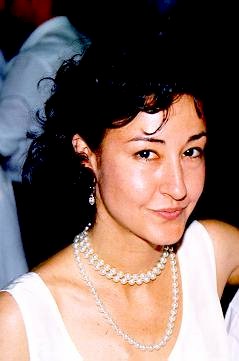
Teacher Linda Giannini
Contact calip@mbox.panservice.it
| Bio data:
Linda Giannini teaches in a kindergarten school (Latina, Italy).
Scholar of several subjects about Education, and advisor for
the application of multi media to education, she collaborates
with the CREATIVE-CyberGroup/LRE EgoCreaNet, and with the University
of Firenze [LTE], Italy. She is also moderator
of some mailing-list such as Tirocinio and dw-infanzia. Graduated
in Philosophy at the University of Ferrara, Italy [degree course
in Technology of audiovisual and multi-media communication].
ICT Consultant of seminars; training courses; educational tv
programs (Mediamente, Multimedi@scuola puntate [5]-[7]-[8], Mosaico [Using educational
CD-ROM in the nursery classes], [Computer in the nursery school];
RAI Taccuino Italiano [april 2010];
InnovatiON [may 2010] and of forums
["Bambini ed internet" - Fila 4 family - World Wide School:
nuovi modi di fare scuola]. She served as critical friend in
LiReMar (Lingua 2 Rete Marche) project; as path and progress
facilitator of the Teacher in Hospitals training course, in
the frame of the HSH@Netword (in collaboration with MIUR/DGSI-CNR/ITD
– Ministry of Public Education, University and Research – Council
of National Research). She is school trainer and coordinator
of the M.P.I. project [Italian Ministry of Public Education]
IBM Kidsmart of the educational room [from 2004 to 2007]; coordinator
of "IL VALORE DELLA DIVERSITA'" [Valuing the Diversity] - DiversaMente
"La diversità come risorsa" for the Department of Multiple Intelligences
and for eTutor on line Giunti. She has belonged to the Technical
Committee of Pirelli International Award 2004; to the on-line
Jury for Pirelli Award 2007. She has collaborated with C.I.R.D.
University of Trieste. She is consultant and editor of educational
materials for Laboratori PuntoEdu - Neoassunti- ForTIC - ForTIC
2 – FOR (ANSAS, former INDIRE, educational on-line environments),
and moderator of the related forum. She has published several
papers and essays for the Edizioni Didattiche Gulliver. Tutor
of the M.P.I. Project Multilab (1996), and of the Piano Nazionale
di Formazione (National Program for Education, CM.55/2002);
supervisor for the traineeship at the Educational Science Degree
Course, Elementary Education, at the University Roma Tre, Rome,
Italy. Member of the Editorial Board of e-didablog and of e-didateca
“Catalogo Nazionale dei prodotti video e multimediali delle
scuole”, [National Catalogue of Video and Multi-media Products
for Education], by the M.P.I. Partner in the European projects
Xplora e Xperimania (about scientific education); national co-coordinator
of the Environment for Young Europeans website of the European
Schoolnet [rif. WHITE PAPER Women and ICT Why
are girls still not attracted to ICT studies and careers?].
Since 1997, she is researching the impact on education by web
communities, chats, 3D world. Involved in European projects
(1999 on) and in Educational Robotics (2003 on). She is currently
supervisor for the traineeship at SSIS tutor, University of
Latium, Italy. She received the 2009 Special Awards “School”
by Museo della Scienza e della Tecnologia (Milan, Italy) Tecnovisionarie®”
2009, and she is 2009/2010 – 2010/11 eTwinning Ambassador.
Home page:
http://www.descrittiva.it/calip/
and other information
http://www.descrittiva.it/calip/1112/linda-giannini-ambasciatrice.htm |
|
| |
| |
| |
| |
|
|
| |
| Technology
tools and Software:
· Pentium 200 Computer
· ISDN card
· Netscape browser
· Eudora electronic mail system
· Scanner HP
· Laser and inkjet printers
· Digital camera
· TV
· Video projector
· Video tapes
· Educational CD
· Encyclopaedia (Multimedia and printed)
· Tape recorder
· Audio cassettes
· Word 97
for Web-page creation and production of letters to be sent as
e-mail attachments
Graphics
Techniques:
·
Water color
· Alcohol color
· Pencil color
· Wax color
· Paint
· Paint Shop Pro 5
Educational
Methodologies:
·
Research
· Exploration
· Comparison
· Hypotheses-formulation |
|
|
|
| 
|
|
|
|